How to Run a Cobot Risk Assessment Before You Buy.
The short version
- 01 A cobot is only collaborative as part of a specific application.
- 02 The end tool and workpiece often create the biggest hazards.
- 03 Assess setup, programming and maintenance, not just normal running.
- 04 Document the assessment and repeat it after any change.
- 05 Ask vendors for safety documents before you sign the order.
A cobot risk assessment covers the whole work cell, not just the robot arm. Describe the task, the tool and the workpiece. Then find the hazards in every mode, including setup and maintenance, choose controls and test them. Do it before you buy, because the tool and the layout decide how safe a cobot really is.
This guide is for plant managers, operations leads and founders who are about to put a collaborative robot on the floor. It walks through the assessment in four steps and ends with questions to ask a vendor. Tech Business Town covers industrial technology, and safety questions come up in almost every automation purchase.
You do not need to be a safety engineer to run the first pass. You do need to know what the robot will hold, where people will stand and what happens when someone has to reach in.
Why a Cobot Is Not Safe by Default
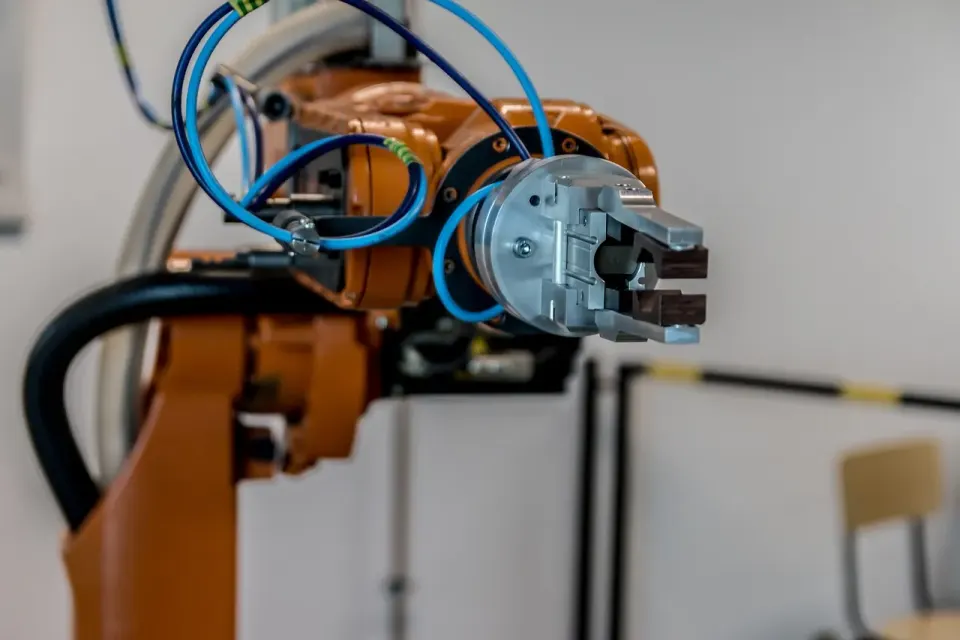
The word "collaborative" describes how a robot is used, not a guarantee built into the machine. Wikipedia's cobot entry notes that standards have no official definition of a cobot, and that whether a robot is collaborative depends on the application. A robot wielding a cutting tool or a sharp workpiece would be hazardous even if the arm itself is gentle.
That is the first thing a buyer should absorb. A cobot sold as safe can still be unsafe once you bolt on a gripper with sharp edges, a welding torch or a heavy part. The robot, the tool and the part form one system, and the assessment has to cover all three.
The international technical specification for this work is ISO/TS 15066:2016, which sets out safety requirements for collaborative industrial robot systems and the work environment. It supplements the general industrial robot standards. It applies to industrial robot systems, so a robot that is not an industrial robot falls outside it.
What Standards Apply to a Cobot Cell?
In the United States, the main reference is ANSI/RIA R15.06, which is the national adoption of the ISO 10218 robot safety standards. A companion technical report, RIA TR 606, adopts ISO/TS 15066 for collaborative robots. The Occupational Safety and Health Administration (OSHA) does not have a robotics-specific standard of its own.
OSHA's robotics standards page says there are currently no specific OSHA standards for the robotics industry, and it points to these industry documents instead. It describes Part 1 of the R15.06 standard as covering robot manufacture and Part 2 as covering system integration and installation. The second part is where a buyer's finished cell lives, even when an integrator does the work.
ISO 10218-1:2011 sets requirements for the inherently safe design of industrial robots, with protective measures and information for use. It describes the basic hazards of robots and requires that those risks be eliminated or adequately reduced. It does not treat the robot as a complete machine, which is why the cell-level assessment falls to you and your integrator.
Step 1: Describe the Application, Tool and Workpiece
Write a one-page description before you assess anything. State what the robot does, how fast the cycle runs and how often a person loads or unloads parts. Name the end tool, the heaviest workpiece and any sharp, hot or pinching surfaces.
Add a simple floor sketch. Mark where people stand, where they walk and where they reach. The sketch will expose the reach points that a spec sheet hides.
Then list the foreseeable misuse. Operators will lean on the cell to clear a jam and a forklift driver will cut across it. Include those cases in the description.
Step 2: List Hazards Across the Whole Cycle, Including Setup
Most teams assess normal running and stop there. That misses where injuries happen. OSHA's robotics overview says studies indicate many robot accidents occur during non-routine operating conditions, such as programming, maintenance, testing, setup or adjustment. In those tasks, a worker may be inside the robot's working envelope when an unintended motion starts.

Walk the cycle in order and list every task where a person is near the robot. Use these headings for each task:
- Normal running and load or unload by hand.
- Teaching or programming a new path.
- Clearing a jam or recovering from a fault.
- Cleaning, tool change and maintenance.
- Restart after an emergency stop.
For each task, record the hazard, who is exposed and how severe the injury could be. Contact with a moving arm is one hazard. Pinching between the arm and a fixed object is another, and so is a dropped workpiece.
Step 3: Choose Controls and Decide What Still Needs a Guard
Once a hazard is on the list, choose a control and write it down. Remove the hazard in the design first, for example by rounding a gripper edge or lowering the payload. Add protective measures next, and use training and signs last.

The tool often decides whether a cell can stay open. A welding or cutting application usually needs a fence, a light curtain or another guard, even on a cobot arm. OSHA's hazard evaluation page stresses that identifying hazards is not enough and that control measures must be put in place and followed. The page links to fatality reports involving robot equipment.
Match every control to a hazard on your list. If a hazard has no control, the assessment is not finished. If a control has no hazard, ask why you are paying for it.
Step 4: Verify, Document and Repeat After Any Change
Test the controls with the cell running. Trigger the emergency stop, break the light curtain and check the restart behavior. Record who tested each item and when.
Keep the assessment with the machine records. Update it whenever you change the tool, the payload, the speed, the layout or the program. A cobot that was fine with a light gripper may not be fine with a heavier one.
Train the people who work near the cell on what they saw in the assessment. Show them the stop buttons and the reach points. Short, specific training beats a long slide deck.
A Sample Risk Register for a Palletizing Cell
A short register keeps the assessment readable for the people who sign it. The example below is a made-up palletizing cell, so treat it as a format to copy and not as a finding about any real product.
| Task | Hazard | Control | Test |
|---|---|---|---|
| Normal palletizing | Contact with the moving arm | Speed and force limits, clear floor marking | Measure contact with a test device |
| Pallet change | Pinch between arm and rack | Light curtain stops the arm | Break the beam during a cycle |
| Teaching a new pattern | Unexpected motion near the operator | Reduced speed and enabling device | Check speed during teach mode |
| Clearing a jam | Entry into the working area | Lock-out before entry | Confirm the arm cannot restart |
| Tool change | Dropped gripper or sharp edge | Guarded tool, written procedure | Walk through with the operator |
Read the table by row. Each task has one hazard, one control and one way to prove the control works. A row with a blank test column is a promise, not a safeguard.
Notice that three of the five rows involve setup, jams or tool changes. Normal palletizing is the easiest row to get right, and the other rows are where a real cell tends to need more work. Your own register will be longer, but it should keep this shape.
Common Mistakes to Avoid
The first mistake is assessing the robot instead of the cell. A vendor brochure can only describe the arm, and your application adds the tool, the part and the people. Assess what you will actually run.
The second mistake is treating the document as paperwork. If the assessment lives in a drawer and nobody reads it again, it will be out of date after the first tool change. Review it on a fixed schedule and after every change.
The third mistake is leaving operators out of the room. People who load the cell every day know where the awkward reach points are, and they know which guards get bypassed. Ask them to walk the cell with you before you finalize the list of hazards.
The fourth mistake is relying on speed alone. A slow robot with a sharp tool is still a hazard, and a fast one in a fenced cell may be fine. Judge the whole combination of tool, part, speed and access.
What to Ask a Vendor Before You Sign
Ask for the safety documents in writing before the purchase order. Request the robot's declaration of conformity and the list of safety functions it provides. Ask which standards the integrator will assess the finished cell against.
Ask who owns the risk assessment for the finished cell. The robot maker covers the robot. The integrator or the buyer covers the application. If nobody owns it, you do.
Ask what changes would require a new assessment, and what the vendor charges to redo it. Put the answers in the contract. At Tech Business Town, we advise buyers to treat the assessment as a deliverable with a named owner, not a favor.
Conclusion
A cobot risk assessment is a short, practical document: the application, the hazards in every mode, the controls and the test results. It protects people, and it also avoids the cost of retrofitting guards after delivery.
Next step: write the one-page application description this week and send it to your integrator. Ask them to mark every task where a person gets close to the arm.
Is a collaborative robot safe to use without a fence?
Which standard covers collaborative robot safety?
Who is responsible for the cobot risk assessment?
When do you need to repeat a cobot risk assessment?
About the author
Helen Markham
Helen Markham edits the robotics and mechatronics desks. She spent nine years as a controls engineer integrating robot cells for contract manufacturers before she started writing about them, and she still reads a risk assessment before she reads a press release.
All stories by Helen 3 stories
Keep reading
More from
the newsroom.




Liked this?
Get five more.
For founders, engineers and operators who would rather read the spec sheet than the press release.
The Town Crier Free
Your week in industry, in five minutes.
One email on Wednesday morning. The stories worth your time this week, and nothing else.
No spam. Unsubscribe anytime.